It is very important to add visual elements like icons to an application, because it is easier for the user to understand what this button/label/etc. means. (Sure you have to choose the right icon 😉 )
With Xamarin.Forms it is very easy to add icons for the different platforms. In my example I am using Segoe MDL2 Assets (https://docs.microsoft.com/en-us/windows/uwp/design/style/segoe-ui-symbol-font).
If you want to add this Fontfamily to your application, you have to do the following steps:
- Download the font-family
- Add the file to the android project
- Add the file to the iOS projcet
- use it 🙂
Android Project
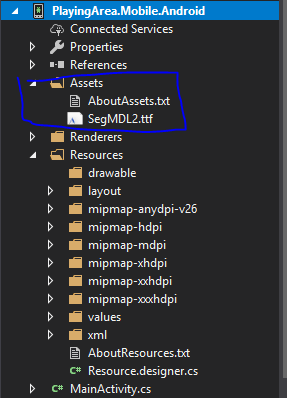
you have to add the file to the asserts folder:
iOS Project
If you have added the file to the projects you have to add the following code, for example the app.xaml:
<OnPlaftorm x:Key=“SegMdl2″
x:TypeArguments=“x:String“
Android=“SegMDL2.ttf#Segoe MDL2 Assets“
iOS=“Segoe MDL2 Assets“/>
Now you can use it wherever you want like this:


 AustrianCoding